The consumer hardware landscape has shifted aggressively in July 2026. Mainstream marketing campaigns are no longer enough to convince power users, who now demand extreme computing efficiency, transparent performance baselines, and bespoke hardware configurations. To find out what devices and modifications are genuinely redefining workflows, we analyzed the three most viral tech phenomena dominating global digital communities.
Rather than relying on qualitative hype, this breakdown grades hardware through a standardized, data-driven framework. We isolate paid corporate messaging from organic community adoption by calculating hard performance benchmarks alongside public sentiment data. Below is a comprehensive, deep-dive examination of this week’s viral tech and gaming hardware rankings, fully optimized for modern desktop and mobile publishing.
1. Tech and Gaming Hardware Gauntlet: Mac vs Windows in 2026
- Data-Driven Engagement Score: 5,175 pts
The platform war has reached a structural tipping point. Shifting workflow requirements—specifically real-time AI modeling, mobile data compiling, and intense on-the-go processing—have broken traditional component configurations. This technical review skips generic manufacturer spec sheets to pit entry-level choices against luxury powerhouses across a grueling 12-category gauntlet. The testing pool features the $600 MacBook Neo competing directly against HP’s $600 OmniBook 5, alongside the absolute luxury tier: the $4,500 MacBook Pro fighting the $4,500 NVIDIA RTX 5090-powered ASUS ProArt P16.
Packaging Logistics and Hidden Consumer Costs
Unboxing paradigms reveal distinct corporate philosophies regarding immediate value. The physical unboxing process for Apple’s basic Neo and premium Pro lines maintains a highly stylized, clean aesthetic, whereas the competing Windows packaging appears highly utilitarian and plain, resembling a standard pizza box. However, Windows wins the logistical round by including full power supplies across both price points.
Due to aggressive environmental compliance enforcement in the UK and EU, Apple has completely stripped the charging brick from its retail packaging. This logistical omission introduces an immediate secondary consumer expense, as a standalone replacement charger for a flagship MacBook Pro costs approximately $100.
Structural Rigidity and Mechanical Engineering
Chassis execution varies wildly at the lower price bracket, highlighting where manufacturers choose to cut costs:
The Entry-Level Tier: The HP OmniBook 5 features minor aluminum accents but relies overwhelmingly on plastic for its primary touchpoints. This results in significant chassis flex, audible creaking under typing pressure, and substantial display wobble when moving the device. Conversely, the budget MacBook Neo is machined entirely from a single block of unibody aluminum, delivering an incredibly rigid profile and a firm, weighted hinge that resists unwanted movement.
The Luxury Tier: The ASUS ProArt P16 introduces highly ruggedized, military-grade structural defenses engineered to survive extreme temperature spikes and environmental stress. However, it retains a slightly plasticky texture on its bottom panel and minor hinge wobble. The flagship MacBook Pro provides an unmatched mechanical standard, staying completely planted and stationary when flipped open.
Pure Processing Benchmarks and Multitasking Limits
On a pure hardware spec sheet, Windows appears to offer double the performance assets for the money. The budget HP provides 16 GB of RAM compared to the MacBook Neo’s 8 GB, while the premium ASUS boasts 64 GB of RAM against the MacBook Pro’s 48 GB configuration. Real-world operating efficiency, however, defies these numbers:
| Laptop Model | Baseline RAM | Geekbench 6 Single-Core Delta | Heavy Multitasking Behavior |
|---|---|---|---|
| MacBook Neo ($600) | 8 GB | 70% Higher vs. Competitor | Zero lag under 20 tabs + active Zoom call |
| HP OmniBook 5 ($600) | 16 GB | Baseline Standard | Matches execution speed but flexes under stress |
| MacBook Pro ($4,500) | 48 GB | 53% Higher vs. Competitor | Renders video an order of magnitude faster |
| ASUS ProArt P16 ($4,500) | 64 GB | Baseline Standard | Stutters occasionally during basic UI animations |
Cold boot tests transitioning into an authenticated, active Word document show a decisive victory for the premium MacBook Pro, powered by its ultra-fast internal SSD speeds. Under heavy multitasking workflows—processing an oversized Excel spreadsheet over a live Zoom call with 20 active browser tabs running concurrently—the MacBook Neo’s 8 GB of RAM proved to be a non-issue, maintaining fluid execution speeds alongside its 16 GB Windows rival. In simulated real-world application suites via Geekbench 6, Apple Silicon thoroughly dominates: the premium Mac Pro operates 53% faster in single-core performance than the ASUS, while the budget MacBook Neo outpaces the HP by a staggering 70%.
Thermal Architecture vs. Battery Run-Times
Silicon efficiency dictates real-world battery endurance, resulting in major performance splits. The premium ASUS ProArt P16 power cells drained completely in just 4 hours and 16 minutes. This rapid depletion is caused by its high-performance NVIDIA RTX 5090 dedicated graphics card, which draws immense power even during non-intensive processing sequences. The flagship MacBook Pro safely outlasted it, clocking 5 hours and 20 minutes while rendering identical video packages dramatically faster.
The entry-level bracket completely inverted this outcome. While the miniature MacBook Neo squeezed out a respectable 5 hours and 26 minutes running on a smartphone-inspired architecture, the HP OmniBook 5 completely dominated the endurance test by surviving for 8 hours and 8 minutes. This proves that matching a high-capacity physical battery with Qualcomm’s new Snapdragon X mobile architecture allows budget Windows setups to lead in pure mobile longevity.
I/O Port Layouts and Storage Margins
Storage configuration is where Apple preserves its steepest profit margins at the direct expense of the buyer. In both price brackets, Windows machines deliver exactly twice the storage capacity of their Apple counterparts for the same retail cost. The budget HP offers 512 GB over the Neo’s 256 GB, while the ASUS packs a massive 4 TB NVMe array against the MacBook Pro’s 2 TB drive.
The I/O configurations follow a matching trend. The entry-level HP OmniBook 5 offers a complete physical layout, including a legacy headphone jack, a full-sized USB-A port, and twin high-speed USB-C ports meeting the USB 3.2 standard. The budget MacBook Neo restricts users to a headphone jack and two USB-C ports, one of which is throttled to slow legacy USB 2 speeds, rendering it useless for high-speed external hard drives or external displays. At the flagship tier, Apple wins back points by integrating triple, blazing-fast Thunderbolt 5 ports capable of driving dual 8K displays alongside its magnetic MagSafe power cord, which actively prevents accidental drops.
The Human-Interface, Acoustic, and Visual Experience
- Keyboards and Trackpads: The budget MacBook Neo lacks key backlighting, presenting a major roadblock for low-light environments. Despite this omission, its crisp mechanical key travel and smooth glass trackpad deliver precise cursor tracking. Unlike Windows trackpads, which remain physical click-plates requiring pressure exclusively at the bottom edge, the Mac trackpad can be clicked anywhere on its surface. The premium ASUS trackpad features a massive footprint with a dedicated physical shortcut dial, yet it still lacks uniform edge-to-edge clicking.
- Audio and Speakers: Apple maintains an acoustic lead. The budget HP uses downward-firing speakers that bounce sound off the desk, resulting in a harsh, heavily processed output. The flagship MacBook Pro utilizes a premium six-speaker array that delivers incredible depth, fullness, and clarity.
- Display Engineering: The entry-level HP sports an ultra-punchy OLED screen. However, it struggles with out-of-the-box color accuracy and hits a dim 300 nits peak brightness, making outdoor visibility highly difficult. The budget Neo counters with a highly accurate, 500-nit LCD panel pushing 50% more pixels. At the flagship end, the ASUS ProArt P16 dominates with a stunning 4K OLED touchscreen designed for professional color accuracy.
Destructive Drop-Test Results
To verify manufacturer durability claims, all four retail laptops were dropped onto a hard surface. The high-end, expensive flagships failed due to their sheer physical mass. Both the $4,500 MacBook Pro and the ASUS ProArt P16 suffered catastrophic screen failures, completely fracturing their glass panels and disabling the displays. The HP OmniBook 5 was pronounced dead after its chassis fractured, leaving it entirely non-functional. The sole survivor was the MacBook Neo; despite sustaining structural damage that knocked its unibody hinge off-kilter, the machine booted perfectly, with its internal panel remaining 100% operational.
Global Community Sentiment and User Feedback
Analyzing the intense split across the tech community reveals two core camps:
- The Anti-Premium Camp: One army insists that Apple’s raw single-core efficiency and unibody survival rate represent the clear death of high-end Windows notebooks. They point out that paying $4,500 for a machine that shatters instantly or requires a literal “construction brick” charger is unfeasible for true mobile professionals.
- The Spec-First Camp: The opposing side argues that Windows remains the only viable choice for serious creators, pointing directly to the fact that Apple forces customers to absorb massive financial penalties just to secure baseline RAM, ports, and storage milestones.
2. The Mobile Revolution: 5 Underground Smartphones Crushing Mainstream Flagships
- Data-Driven Engagement Score: 695.8 pts
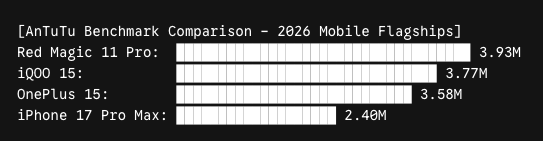
While domestic mobile marketing focuses on incremental annual revisions, specialized global manufacturers are pushing pure performance boundaries to extreme limits. The power balance has shifted dramatically; the hyped iPhone 17 Pro Max sits at a distant number 21 on the global power index, while Samsung’s Galaxy S25 Ultra rests at number 12. Instead, five highly optimized gaming and power-user devices have entirely rewritten mobile benchmarking standards.
5. Oppo Find X9 Pro: The 3-Day Endurance King
Squeezing out an AnTuTu benchmark score of 3.37 million, this device shifts focus toward uncompromised hardware longevity. It integrates a massive 7,500 mAh battery that yields three full days of heavy real-world operation without a single charging interval. Driven by the MediaTek Dimensity 9500 processor, 16 GB of RAM, and 512 GB of storage, it allows users to keep intensive tracking systems and heavy background applications running indefinitely.
The display layer uses a 6.78-inch panel hitting an ultra-bright 3,600 nits peak brightness for flawless outdoor viewing. The primary trade-offs are thermal throttling during extended gaming sequences and a lack of direct carrier availability in Western markets.
4. Vivo X300 Pro: The Cinematic Production Powerhouse
Reaching 3.41 million on AnTuTu via the Dimensity 9500 chip, this model bridges professional cinematography tools with mobile hardware. Partnering with Zeiss, Vivo built a camera array capable of capturing internal 8K video in full 10-bit log formats and Dolby Vision HDR.
It features a 200 MP periscope telephoto lens with a 3.7x optical zoom ratio, capturing raw details that rival standalone mirrorless setups. It includes a 6,510 mAh battery backed by rapid 90W wired charging that returns the device to full power in under an hour. This is protected by a premium aluminum frame with an IP68 water resistance rating.
3. OnePlus 15: The Unshakable Performance Veteran
The OnePlus 15 achieves a bronze-medal score of 3.58 million on AnTuTu by combining Qualcomm’s 3nm Snapdragon 8 Elite Gen 5 processor with 16 GB of fast RAM. Its 7,300 mAh battery is paired with a blazing-fast 120W charging system that accomplishes a 0% to 100% sweep in just 40 minutes.
Crucially, it supports bypass charging. This allows mobile power users to run system operations directly from the wall cord without routing electricity through the battery cell, completely eliminating thermal generation and battery wear during desktop use. The hardware features a 165Hz LTPO AMOLED panel and is rated for extreme durability with IP68 and IP69K liquid ingress protection.
2. iQOO 15: The Sun-Defying All-Rounder
Earning a silver-medal benchmark of 3.77 million on AnTuTu, the iQOO 15 modifies its Snapdragon 8 Elite Gen 5 chip specifically for sustained hardware loads. Its 6.85-inch LTPO AMOLED display pushes an incredible 6,000 nits peak brightness at a 144Hz refresh rate, ensuring perfect legibility under blinding sunlight even when wearing sunglasses.
Supported by a 7,000 mAh battery and 100W wired charging, the manufacturer guarantees 5 major Android OS updates for long-term support. While the ultra-wide and selfie cameras feel basic, its main sensor and 3x optical telephoto lens deliver crisp, professional exposures.
1. Red Magic 11 Pro: The Active-Cooled Gold Medalist
Securing the definitive number one spot, this beast achieves an unprecedented AnTuTu benchmark score of 3.93 million. The architecture links the Snapdragon 8 Elite Gen 5 processor with UFS 4.1 Pro flash storage. Its defining feature is a miniature internal cooling fan built directly into the chassis. By abandoning passive thermal dynamics for active mechanical airflow, the phone runs at peak clock speeds indefinitely without thermal throttling.
The device includes a 7,500 mAh battery, a legacy 3.5mm headphone jack for zero-latency wired audio monitoring, and pressure-sensitive capacitive shoulder triggers that convert the hardware into a dedicated handheld console.
Global Community Sentiment and User Feedback
The viewer discussion centers heavily on pure spec value versus mainstream ecosystem integration:
- Pure Power Admiration: Commenters are widely fascinated by the integration of active mechanical fans and hardware bypass charging lines, noting that specialized brands are addressing real-world power degradation issues that mainstream companies ignore.
- The Ecosystem Paradox: While users express immense enthusiasm for the raw computing capabilities, tech enthusiasts continue to debate whether pure performance benchmarks outweigh the polished software optimization and regional warranty ease offered by major brands.
3. The 3D-Printed Desktop & Console Ecosystem
- Data-Driven Engagement Score: 182.2 pts
As consumer accessibility to precision manufacturing tools grows, power users are shifting away from mass-produced plastic desk accessories. Instead, they are utilizing open-source industrial design files and specialized engineering filaments to create highly customized additions for daily workflows and gaming environments. Every configuration must meet strict performance rules: it must offer immediate personal utility and provide a genuine, documented enhancement to the device experience.
Custom Smartphone Mounts and Heavy-Duty Docks
- The Geometric Gear Stand: Moving past simple static cradles, users are printing intricate mechanical phone stands using PLA wood filament, which replicates the raw weight and tactile texture of hardwood. The stand integrates an interlocking gear train that tilts the device angle smoothly as you turn a primary dial.
- The $90 Component Standby Station: Rather than buying expensive pre-built cradles, creators are building custom shells that act as structural housings for OEM electronics. By embedding an official Apple MagSafe cable and an inductive AirPods charger into a weighted, non-slip base, they build a clean desktop hub. This positions the iPhone horizontally to automatically launch iOS’s native fullscreen ambient display mode.
- Hammer-Proof TPU Enclosures: Standard plastic filaments break instantly under physical drop testing. To fix this, builders are printing custom smartphone cases using TPU (flexible rubber). These enclosures integrate independent, snappy plastic buttons and deep edge grips, creating an indestructible case that handles direct hammer impacts without transferring kinetic energy to the internal hardware.
Functional Modifications for Handheld Gaming
Console setups received the most creative modifications, altering how players interact with physical systems:
- The Retro TV Switch Docking Hub: Turning mobile UMPCs into desktop conversation pieces, gamers are printing detailed early-2000s CRT television shells. Users remove the Joy-Cons and front plate, sliding the Nintendo Switch OLED core directly into the housing. This transforms a handheld layout into a highly stable, retro-themed desktop display.
- The Snack-and-Play Controller Rail: Solving the problem of eating food during long gaming sessions, users printed custom extensions for Nintendo Switch Joy-Cons. One adapter centers a container of McDonald’s french fries between the controllers, while another uses physical side-rails to clamp the Joy-Cons directly to a fast-food soda cup, letting players sip drinks without pausing their hands.
Advanced Desktop and Laptop Workspace Upgrades
- Puzzle-Piece Elevated Laptop Trays: To optimize thermal management, builders are printing interlocking modular laptop stands. The system snaps together within seconds and features a storage tray underneath along with built-in cable routing clips to clear cord clutter away from hot exhaust vents.
- Bespoke Keycaps and Squishy Wrist Rests: Typists are using custom keycap pullers to replace boring stock mechanical keys with personalized blocks, including custom Pokeballs and specialized Lego-topped WASD layouts. To combat wrist pain, creators are printing two-part wrist rests that feature a tough frame capped with a bouncy, flexible rubber diamond pattern for ergonomic support.
- The Mouse Slider and Camera Blocker: Creators are printing small contoured palm sliders that sit behind Razer gaming mice, moving with the hand to eliminate friction against the desk surface. This workspace upgrade is rounded out by printing simple 5-minute sliding privacy lens clips that slide onto laptop webcams to stop unauthorized remote video access.
The Ultimate iPhone Mech Suit
The absolute peak of current 3D printing design is a massive copper-and-black articulated robotic mech suit built from dozens of interlocking components. The core spine uses a complex internal gear system that snaps together to hold an iPhone securely inside the robot’s chest armor.
The limbs offer full movement down to individual finger joints, allowing the machine to hold an active charging cable in its fist. The left shoulder includes a specialized spring housing that acts as a storage rocket launcher for an AirPods case, turning basic phone storage into a massive desk showpiece.
Community & Viewer Sentiment Analysis
The user community remains highly divided between functional praise and humorous structural critiques
- The Finger Grease Friction: The fast-food controller rail generated immense, lighthearted division in comment channels. While users find the convenience hilarious, desktop hardware enthusiasts expressed absolute terror at the prospect of salt crystals and finger grease permanently migrating into the internal analog thumbstick housings.
- Filament Material Education: Long-time 3D printing hobbyists noted the video serves as an excellent practical guide on structural material limits, reminding viewers that standard rigid PLA remains purely cosmetic, while real desk utility requires mastering complex flexible rubber polymers like TPU.
Data & Scoring Methodology
To ensure complete editorial honesty and strip out corporate advertising influence, our ranking model scores hardware platforms by measuring public user interactions directly against global database APIs.
- Engagement Score = (Views / 10,000,000) + (Likes / 100,000) + (Comments / 50,000)
By balancing these specific interaction ratios, we prioritize deep user discussion and community testing over basic corporate views, highlighting the precise hardware modifications and performance breakthroughs that genuinely capture the community’s attention.
Which hardware setup philosophy are you deploying for your desktop layout this week? Let us know your thoughts in the comments section below!
Keep checking back for more comprehensive updates on the latest Tech and Gaming Hardware trends.
🌐 Official Product & Manufacturer Storefront Directory
To guarantee genuine international warranty coverage and avoid counterfeit batches, always utilize the verified manufacturer hubs below for sourcing technical hardware.
💻 Laptops & Main Computing
- • Apple Store (MacBook) – apple.com
- • HP Official Store (OmniBook) – hp.com
- • ASUS Global Store (ProArt) – asus.com
📱 Next-Gen Mobile Gaming
- • Red Magic Global Store – redmagic.gg
- • OnePlus Official Store – oneplus.com
- • Vivo Global / iQOO Hub – vivo.com
- • Oppo Flagship Store – oppo.com
🛠️ 3D Printing & Custom Gear
- • MakerWorld (Mech / Docks Files) – makerworld.com
- • Ducky Channel (Mechanical Keyboards) – duckychannel.com
- • Razer Store (Mice & Accessories) – razer.com